---
title: "YAML vs JSON: Which Format Fits OpenAPI Better?"
description: "Compare YAML and JSON for OpenAPI: readability, comments, parsing speed, tooling, and when to choose each format for editing or automation."
image: https://assets.seobotai.com/cdn-cgi/image/quality=75,w=1536,h=1024/dreamfactory.com/69682e3db8cd632afdd10c90-1768442817294.jpg
---
[](https://www.dreamfactory.com/)
Products & Services
[AI Data Gateway](https://www.dreamfactory.com/ai-data-gateway/overview)
[Overview Why DreamFactory exists](https://www.dreamfactory.com/ai-data-gateway/overview) [Data Gov, Comp, Security Policy enforcement at the API layer](https://www.dreamfactory.com/ai-data-gateway/ai-data-governance) [Standard API Layer One contract for every backend](https://www.dreamfactory.com/ai-data-gateway/standard-api-layer) [API Gateway Functionality Routing, auth, rate limits, observability](https://www.dreamfactory.com/ai-data-gateway/api-gateway-functionality) [Deployment & Integration Self-hosted, cloud, hybrid](https://www.dreamfactory.com/ai-data-gateway/on-premise-deployment-and-integration) [Developer Productivity Auto-generated, never hand-coded](https://www.dreamfactory.com/ai-data-gateway/ai-development-accelerated) [AI App Architectures Patterns for RAG, agents, MCP](https://www.dreamfactory.com/ai-data-gateway/enterprise-ai-architectures)
AI Data Models
[AIOpenAI](https://www.dreamfactory.com/use-cases/openai) [GGoogle Gemini](https://www.dreamfactory.com/use-cases/google-gemini) [CAnthropic Claude](https://www.dreamfactory.com/use-cases/anthropic-claude-landing) [LMeta Llama](https://www.dreamfactory.com/use-cases/meta-llama) [MMistral AI](https://www.dreamfactory.com/use-cases/mistral) [CoCohere](https://www.dreamfactory.com/use-cases/cohere)
Services and support
[Quickstart Service Packages Expert-led Quickstarts to production](https://www.dreamfactory.com/services-and-support/quickstart-services-packages)
API Management
[Generate & Manage REST APIs From any database, in seconds](https://www.dreamfactory.com/api-management/generate-rest-apis) [Features Security, scripting, self-hosted & more](https://www.dreamfactory.com/api-management/features) [API Generation The complete guide to auto-generated APIs](https://blog.dreamfactory.com/a-complete-guide-to-api-generation) [API Management Concepts, tools, and best practises](https://blog.dreamfactory.com/what-is-api-management-a-brief-overview-of-api-management-concepts-and-tools?_gl=1*jl0njh*_gcl_au*MjQzMjgwMTc3LjE3ODIzMjI3MzY)
Use Cases
AI Use Cases
[AI Data Access Secure, governed reads for your LLMs](https://www.dreamfactory.com/use-cases/ai-data-access) [MCP Server Drop-in Model Context Protocol](https://www.dreamfactory.com/use-cases/mcp-server) [Legacy Modernization Wrap mainframes with REST](https://www.dreamfactory.com/use-cases/legacy-modernization) [Data Governance Audit every call, enforce every policy](https://www.dreamfactory.com/use-cases/data-governance)
[Customer Case Studies](https://www.dreamfactory.com/case-studies)
[Energy Modernization](https://www.dreamfactory.com/case-studies/energy-snowflake-modernization) [Government Modernization](https://www.dreamfactory.com/case-studies/government-mainframe-oracle-modernization) [Government Business Intelligence](https://www.dreamfactory.com/case-studies/government-sql-server-bi-analyst-queries) [Manufacturing Modernization](https://www.dreamfactory.com/case-studies/steel-manufacturing-sap-erp-modernization) [Financial Services Investor Portal](https://www.dreamfactory.com/case-studies/financial-services-sql-server-investor-portal) [Non-Profit Partner Data Sharing](https://www.dreamfactory.com/case-studies/non-profit-sql-server-partner-data-sharing) [Professional Services Exec Dashboards](https://www.dreamfactory.com/case-studies/professional-services-erp-dashboards) [Education HR and External Data Sharing](https://www.dreamfactory.com/case-studies/education-student-hr-sql-server-mysql-external-data-sharing)
Industries
Industries
#### [Healthcare HIPAA-grade APIs across EHR, claims, and labs.](https://www.dreamfactory.com/use-cases/healthcare)
#### [Financial Services Portfolios, partners, and portals on one layer.](https://www.dreamfactory.com/use-cases/financial-services)
#### [Government Modernize mainframes without re-platforming.](https://www.dreamfactory.com/use-cases/government)
#### [Manufacturing SAP, MES, and shop-floor data, governed.](https://www.dreamfactory.com/use-cases/manufacturing)
#### [Spotlight How enterprises run on DreamFactory From healthcare to energy to finance — governance baked into every endpoint. Browse case studies →](https://www.dreamfactory.com/case-studies)
Connectors
SQL Database
[SQL SQL Server](https://www.dreamfactory.com/connectors/sql-server) [OR Oracle](https://www.dreamfactory.com/connectors/oracle) [PG PostgreSQL](https://www.dreamfactory.com/connectors/postgresql) [My MySQL](https://www.dreamfactory.com/connectors/mysql)
NoSQL & Docs
[Dy DynamoDB](https://www.dreamfactory.com/connectors/dynamodb) [Do DocumentDB](https://www.dreamfactory.com/connectors/azure-documentdb) [Mo MongoDB](https://www.dreamfactory.com/connectors/mongodb) [Cb CouchDB](https://www.dreamfactory.com/connectors/couch-db)
Cloud Warehouses
[S3 S3](https://www.dreamfactory.com/connectors/amazon-s3) [Ab Azureblob](https://www.dreamfactory.com/connectors/azure-blob) [FS FTP/SFTP](https://www.dreamfactory.com/connectors/ftp-sftp) [LS Local Storage](https://www.dreamfactory.com/connectors/local-storage)
C & SaaS
[Sf Salesforce](https://www.dreamfactory.com/connectors/salesforce) [API REST / SOAP](https://www.dreamfactory.com/connectors/soap-to-rest)
[See all 30+ connectors](https://www.dreamfactory.com/connectors)
[Blog](https://blog.dreamfactory.com/)
[FREE 30 Minute Demo](https://www.dreamfactory.com/demo)
[](https://www.dreamfactory.com/)
 
Back to main menu
Products & Services
Use Cases
Industries
Connectors
[Blog](https://blog.dreamfactory.com/)
[FREE 30 Minute Demo](https://www.dreamfactory.com/demo)
[AI Data Gateway](https://www.dreamfactory.com/ai-data-gateway/overview)
[Overview Why DreamFactory exists](https://www.dreamfactory.com/ai-data-gateway/overview) [Data Gov, Comp, Security Policy enforcement at the API layer](https://www.dreamfactory.com/ai-data-gateway/ai-data-governance) [Standard API Layer One contract for every backend](https://www.dreamfactory.com/ai-data-gateway/standard-api-layer) [API Gateway Functionality Routing, auth, rate limits, observability](https://www.dreamfactory.com/ai-data-gateway/api-gateway-functionality) [Deployment & Integration Self-hosted, cloud, hybrid](https://www.dreamfactory.com/ai-data-gateway/on-premise-deployment-and-integration) [Developer Productivity Auto-generated, never hand-coded](https://www.dreamfactory.com/ai-data-gateway/ai-development-accelerated) [AI App Architectures Patterns for RAG, agents, MCP](https://www.dreamfactory.com/ai-data-gateway/enterprise-ai-architectures)
AI Data Models
[AIOpenAI](https://www.dreamfactory.com/use-cases/openai) [GGoogle Gemini](https://www.dreamfactory.com/use-cases/google-gemini) [CAnthropic Claude](https://www.dreamfactory.com/use-cases/anthropic-claude-landing) [LMeta Llama](https://www.dreamfactory.com/use-cases/meta-llama) [MMistral AI](https://www.dreamfactory.com/use-cases/mistral) [CoCohere](https://www.dreamfactory.com/use-cases/cohere)
Services and support
[Quickstart Service Packages Expert-led Quickstarts to production](https://www.dreamfactory.com/services-and-support/quickstart-services-packages)
AI Data Models
[Generate & Manage REST APIs From any database, in seconds](https://www.dreamfactory.com/api-management/generate-rest-apis) [Features Security, scripting, self-hosted & more](https://www.dreamfactory.com/api-management/features) [API Generation The complete guide to auto-generated APIs](https://blog.dreamfactory.com/a-complete-guide-to-api-generation) [API Management Concepts, tools, and best practises](https://blog.dreamfactory.com/what-is-api-management-a-brief-overview-of-api-management-concepts-and-tools?_gl=1*jl0njh*_gcl_au*MjQzMjgwMTc3LjE3ODIzMjI3MzY)
AI Use Cases
[AI Data Access Secure, governed reads for your LLMs](https://www.dreamfactory.com/use-cases/ai-data-access) [MCP Server Drop-in Model Context Protocol](https://www.dreamfactory.com/use-cases/mcp-server) [Legacy Modernization Wrap mainframes with REST](https://www.dreamfactory.com/use-cases/legacy-modernization) [Data Governance Audit every call, enforce every policy](https://www.dreamfactory.com/use-cases/data-governance)
[Customer Case Studies](https://www.dreamfactory.com/case-studies)
[Energy Modernization](https://www.dreamfactory.com/case-studies/energy-snowflake-modernization) [Government Modernization](https://www.dreamfactory.com/case-studies/government-mainframe-oracle-modernization) [Government Business Intelligence](https://www.dreamfactory.com/case-studies/government-sql-server-bi-analyst-queries) [Manufacturing Modernization](https://www.dreamfactory.com/case-studies/steel-manufacturing-sap-erp-modernization) [Financial Services Investor Portal](https://www.dreamfactory.com/case-studies/financial-services-sql-server-investor-portal) [Non-Profit Partner Data Sharing](https://www.dreamfactory.com/case-studies/non-profit-sql-server-partner-data-sharing) [Professional Services Exec Dashboards](https://www.dreamfactory.com/case-studies/professional-services-erp-dashboards) [Education HR and External Data Sharing](https://www.dreamfactory.com/case-studies/education-student-hr-sql-server-mysql-external-data-sharing)
Industries
#### [Healthcare HIPAA-grade APIs across EHR, claims, and labs.](https://www.dreamfactory.com/use-cases/healthcare)
#### [Financial Services Portfolios, partners, and portals on one layer.](https://www.dreamfactory.com/use-cases/financial-services)
#### [Government Modernize mainframes without re-platforming.](https://www.dreamfactory.com/use-cases/government)
#### [Manufacturing SAP, MES, and shop-floor data, governed.](https://www.dreamfactory.com/use-cases/manufacturing)
SQL Database
[SQL SQL Server](https://www.dreamfactory.com/connectors/sql-server) [OR Oracle](https://www.dreamfactory.com/connectors/oracle) [PG PostgreSQL](https://www.dreamfactory.com/connectors/postgresql) [My MySQL](https://www.dreamfactory.com/connectors/mysql)
NoSQL & Docs
[Dy DynamoDB](https://www.dreamfactory.com/connectors/dynamodb) [Do DocumentDB](https://www.dreamfactory.com/connectors/azure-documentdb) [Mo MongoDB](https://www.dreamfactory.com/connectors/mongodb) [Cb CouchDB](https://www.dreamfactory.com/connectors/couch-db)
Cloud Warehouses
[S3 S3](https://www.dreamfactory.com/connectors/amazon-s3) [Ab Azureblob](https://www.dreamfactory.com/connectors/azure-blob) [FS FTP/SFTP](https://www.dreamfactory.com/connectors/ftp-sftp) [LS Local Storage](https://www.dreamfactory.com/connectors/local-storage)
C & SaaS
[Sf Salesforce](https://www.dreamfactory.com/connectors/salesforce) [API REST / SOAP](https://www.dreamfactory.com/connectors/soap-to-rest)
[See all 30+ connectors](https://www.dreamfactory.com/connectors)
[ Blog](https://blog.dreamfactory.com/)
# YAML vs JSON: Which Format Fits OpenAPI Better?
by Kevin Hood
 January 27, 2026
Table of contents
RECOMMENDED ARTICLES
- [A Complete Guide to API Generation](https://blog.dreamfactory.com/a-complete-guide-to-api-generation)
- [10 Best API Management Tools](https://blog.dreamfactory.com/what-is-api-management-a-brief-overview-of-api-management-concepts-and-tools)
- [Creating a Microsoft SQL Server API in Less Than 5 minutes with DreamFactory](https://blog.dreamfactory.com/creating-a-microsoft-sql-server-api-in-less-than-5-minutes-with-dreamfactory)
- [Hasura vs. DreamFactory: A Comprehensive Comparison](https://blog.dreamfactory.com/hasura-vs-dreamfactory)
- [Build A Snowflake REST API in Less Than 5 Minutes](https://blog.dreamfactory.com/generate-a-snowflake-rest-api-in-less-than-5-minutes)
**YAML is often the better choice for [OpenAPI](https://www.openapis.org/) specifications** due to its readability and ease of manual editing. It uses indentation instead of braces and brackets, supports inline comments with `#`, and handles multi-line text more naturally. This makes YAML easier to maintain and understand, especially for teams collaborating on [API documentation tools](https://blog.dreamfactory.com/5-best-api-documentation-tools). However, JSON has its strengths too. Its strict syntax ensures precision, making it ideal for automated workflows and machine-driven processes where speed matters.
**DreamFactory is a secure, self-hosted enterprise data access platform that provides governed API access to any data source, connecting enterprise applications and on-prem LLMs with role-based access and identity passthrough.**
### Key Points:
- **YAML**: More human-readable, supports comments, and works well for manual editing.
- **JSON**: Faster parsing, stricter syntax, and better suited for automation.
- **Interchangeability**: OpenAPI supports both formats equally, and tools allow seamless conversions between them.
### Quick Comparison:
| Feature | JSON | YAML |
| --- | --- | --- |
| **Readability** | Moderate (braces/brackets) | High (indentation-based) |
| **Comments** | Not supported | Supported (`#`) |
| **Parsing Speed** | Faster | Slower |
| **Error Handling** | Clear syntax errors | Prone to indentation issues |
| **Multi-line Text** | Requires escaping | Handles naturally |
**Conclusion**: Use YAML for manual editing and collaboration. Opt for JSON in performance-critical environments or for automation tasks. Both formats are interchangeable, so you can switch as needed.
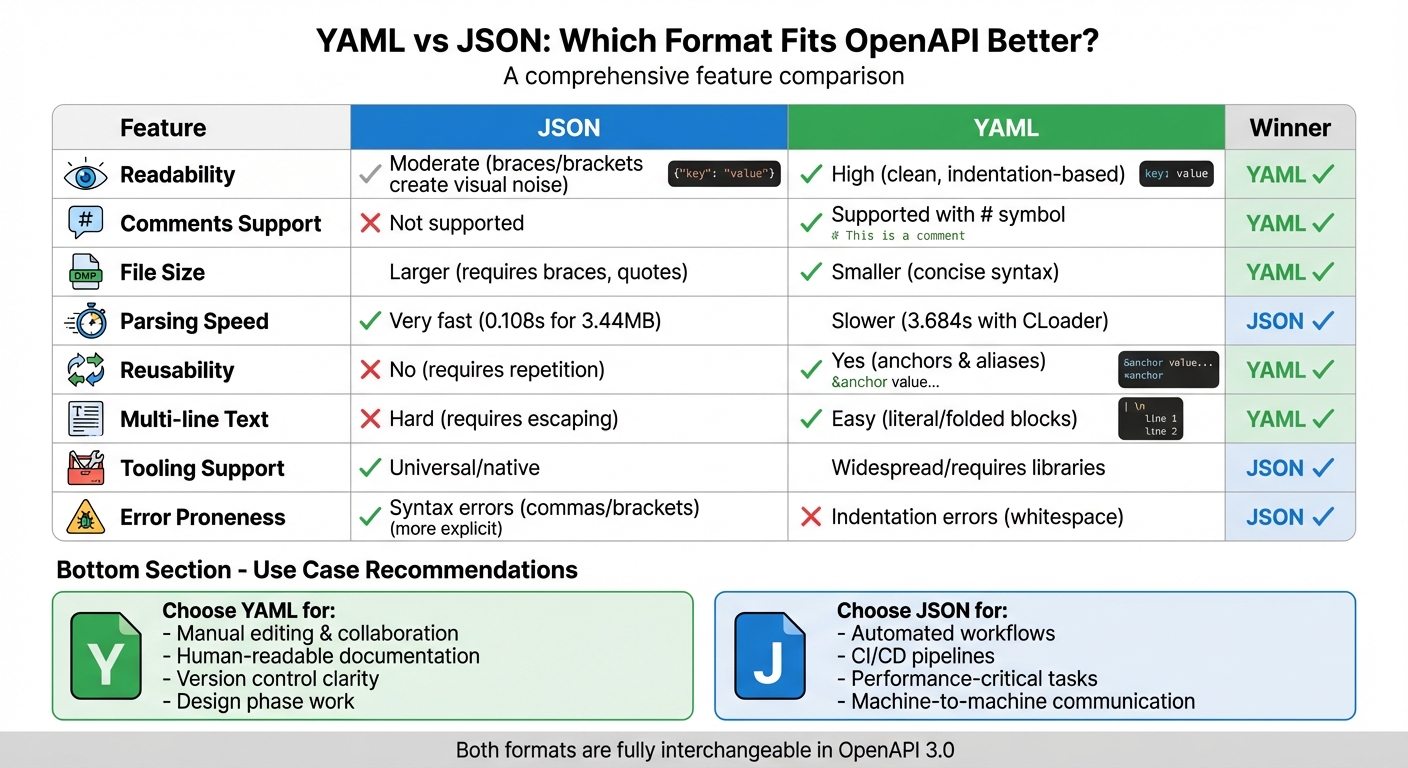
YAML vs JSON for OpenAPI: Feature Comparison Chart
## YAML vs JSON for [OpenAPI](https://www.openapis.org/)
VIDEO
## Syntax Differences Between YAML and JSON
OpenAPI syntax is governed by the distinct rules of each format. JSON uses **curly braces `{}`**, **square brackets `[]`**, and **commas** to separate fields. YAML, on the other hand, relies on **indentation** and **newlines** to define hierarchy, with **hyphens `-`** marking array items.
One notable difference lies in string handling. JSON mandates **double quotes** for all keys and string values. YAML, however, allows unquoted strings in most cases, making the files easier to read. That said, quotes are still available when handling strings with special characters, offering flexibility while maintaining clarity.
Another key distinction is in comments. YAML supports **inline comments** using the hash symbol `#`, which is particularly helpful for documenting complex API elements. JSON, unfortunately, lacks native support for comments, making it harder to embed explanatory notes directly within the file. As Steve Bennett from [Stack Overflow](https://stackoverflow.com/) aptly pointed out:
> "The lack of comments in JSON is, in practice, a real pain".
Grasping these syntax rules is essential for [building an API](https://blog.dreamfactory.com/key-questions-to-ask-when-building-an-api/) and understanding how each format functions within OpenAPI.
### JSON Syntax for OpenAPI
JSON enforces structure through its use of braces, brackets, and commas, which ensures precision and minimizes ambiguity. The OpenAPI Initiative highlights this benefit:
> "JSON's explicit syntax reduces the chances of ambiguity or misinterpretation".
Here’s an example of an OpenAPI path written in JSON:
`{"paths": {"/users": {"get": {"summary": "List users"}}}}`
Notice how **double quotes** are required for every string. Additionally, a missing comma can render the entire file invalid. While JSON’s strict formatting makes it easier for machines to parse, it can be tedious for humans to write and maintain.
### YAML Syntax for OpenAPI
YAML takes a different approach by eliminating most structural characters, relying instead on **whitespace** to define relationships. Indentation levels indicate hierarchy, and array items are marked with hyphens. Multiline strings can be written naturally, without needing concatenation symbols.
Here’s the same OpenAPI path expressed in YAML:
```
paths:
/users:
get:
summary: List users
```
No braces, brackets, or quotes are needed here. YAML also allows mixing in JSON-style syntax, such as inline arrays, when it enhances readability.
One crucial rule in YAML is the prohibition of tabs for indentation - **only spaces are allowed**. Mixing tabs and spaces will cause parsing errors, so using an editor that highlights whitespace can help avoid these issues.
These syntax differences play a significant role in how OpenAPI specifications are written, supported, and maintained.
## OpenAPI Specification Support for YAML and JSON
The OpenAPI Specification (OAS) supports both YAML and JSON equally, treating them as interchangeable formats. Regardless of whether the file uses a `.json` or `.yaml` extension, an OpenAPI description is always a JSON object at its core. As the specification explains:
> "The syntax (language) used to write OpenAPI Descriptions can be JSON, YAML or both".
This flexibility lets you pick the format that aligns best with your workflow without losing any functionality. To ensure smooth interchangeability between the two, the specification recommends using YAML 1.2, which allows seamless conversion to and from JSON. Since YAML is a superset of JSON, you can even include inline JSON arrays within a YAML file. This universal compatibility supports a wide range of tools, making it easier to work with OpenAPI.
For instance, **[Swagger Editor](https://swagger.io/tools/swagger-editor/)** supports both formats, allowing you to switch effortlessly between JSON and YAML views. Similarly, **[OpenAPI Generator](https://openapi-generator.tech/)**, a community-driven tool, can process specifications in either format to create client SDKs, server stubs, and documentation. Other command-line utilities like `swagger-cli` and `openapi-generator` also enable automated conversions, making them perfect for CI/CD workflows.
In enterprise environments, tools like **[DreamFactory](https://dreamfactory.com/)** take automation a step further. DreamFactory can generate OpenAPI 3.0 specifications in both JSON and YAML by analyzing database schemas from over 20 data sources, including [SQL Server](https://blog.dreamfactory.com/unleashing-the-power-of-api-generation-for-sql-server-databases-an-exciting-innovation/) and MongoDB. This automation replaces the tedious task of documenting hundreds of endpoints manually - a process that could take around 250 hours - by completing it in under five minutes.
The process starts with an entry document, such as `openapi.json` or `openapi.yaml`. Tools validate these files in real time, ensuring they adhere to OAS standards before proceeding with code or documentation generation. This approach streamlines the entire API development and documentation lifecycle.
## YAML vs JSON: Pros and Cons
Choosing between YAML and JSON for OpenAPI specifications often comes down to understanding the strengths and weaknesses of each format. **JSON is known for its speed and simplicity, thanks to its lightweight parsers and streamlined grammar.** This makes it ideal for fast stream parsing. In contrast, YAML's more extensive specification can slow down processing. As Argborg puts it:
> "JSON is the performance and scalability baseline across platforms".
**YAML, on the other hand, shines in terms of human readability and developer friendliness.** Its clean, indentation-based syntax reduces visual clutter compared to JSON's braces and quotes. YAML also supports native comments using the `#` symbol, allowing developers to document intent directly within the specification - something JSON lacks. Additional features like anchors (`&`) and aliases (`*`) make it easier to reuse content, while multi-line strings with literal (`|`) and folded (`>`) blocks simplify handling long descriptions without needing escape characters.
While JSON's explicit syntax (with its use of quotes and braces) minimizes errors caused by misinterpretation, it can feel cumbersome compared to YAML's whitespace-based structure. However, YAML's reliance on indentation makes it more prone to errors if not handled carefully. That said, YAML's cleaner, line-by-line format is often easier to work with in version control systems like Git, especially when comparing changes. From a security perspective, JSON's minimalist design reduces potential vulnerabilities, whereas YAML's advanced features can introduce risks unless "safe load" modes are used.
### Comparison Table: YAML vs JSON
| Feature | JSON | YAML | Better for OpenAPI? |
| --- | --- | --- | --- |
| **Readability** | Moderate (high visual noise) | High (clean, indentation-based) | **YAML** |
| **Comments** | No native support | Yes (using `#`) | **YAML** |
| **File Size** | Larger (braces/quotes) | Smaller (concise syntax) | **YAML** |
| **Parsing Speed** | Very fast | Slower | **JSON** |
| **Reusability** | No (requires repetition) | Yes (anchors and aliases) | **YAML** |
| **Multi-line Text** | Hard (requires escaping) | Easy (literal/folded blocks) | **YAML** |
| **Tooling** | Universal/native support | Widespread/requires libraries | **JSON** |
| **Error Proneness** | Syntax (commas/brackets) | Indentation (whitespace) | **JSON** (more explicit) |
The table highlights a clear divide: YAML excels in developer experience, while JSON stands out for performance and reliability. For OpenAPI specifications - where clarity and maintainability are key - YAML often proves to be the better choice. Unlike JSON, OpenAPI files are typically written manually rather than parsed repeatedly, making YAML's readability and convenience more valuable than JSON's speed.
These differences underline the importance of balancing readability, tooling compatibility, and workflow integration when [writing great API documentation](https://blog.dreamfactory.com/7-tips-to-write-great-api-documentation).
## Readability and Maintenance in API Documentation
When dealing with OpenAPI specifications regularly, **readability becomes a cornerstone for effective long-term maintenance**. YAML's indentation-based structure is much easier on the eyes compared to JSON's cluttered, bracket-heavy format. As [SnapLogic](https://www.snaplogic.com/) aptly states:
> "YAML is the most human-readable data serialization format."
One of YAML's standout features is its **native support for comments** using the `#` symbol. These inline comments make it easier for developers to clarify complex sections and collaborate effectively. JSON, on the other hand, lacks this capability, leaving teams to either skip internal documentation or rely on awkward workarounds.
YAML's clarity also shines when working with version control systems like Git. Its line-by-line structure makes changes easy to spot, whereas JSON’s syntax often buries meaningful differences, making them harder to identify at a glance.
Another practical advantage of YAML is how it handles long descriptions. Using literal mode (`|`) preserves line breaks, while folded mode (`>`) removes them - both are incredibly useful for managing multi-line Markdown content in API documentation.
However, YAML isn't without its quirks. Its strict indentation rules mean that even a small mistake can cause significant errors in large files. JSON, with its explicit delimiters like braces and brackets, avoids this issue, though its syntax sacrifices readability. As the OpenAPI Guide notes, "YAML is typically preferred because of its slightly reduced file size", and it's far easier for humans to write, edit, and maintain.
Ultimately, better readability in YAML contributes to faster updates, fewer errors, and smoother collaboration when following [API development best practices](https://blog.dreamfactory.com/api-development-best-practices) for documentation management.
## Tools and Ecosystem for OpenAPI Workflows
The OpenAPI ecosystem is packed with tools designed to work seamlessly with both YAML and JSON formats, making it easy to switch between the two as needed.
For interactive API design, **Swagger Editor** stands out as a widely-used web-based tool. It provides real-time validation and live previews, allowing users to toggle effortlessly between YAML and JSON views. For teams seeking advanced collaboration features, **[SwaggerHub](https://app.swaggerhub.com/)** builds on these capabilities by offering version control and integration options, ensuring a centralized and consistent workflow.
When it comes to generating client libraries and server stubs, tools like **OpenAPI Generator** and **[Swagger Codegen](https://swagger.io/tools/swagger-codegen/)** are invaluable. OpenAPI Generator, a community-driven project, supports a broader range of programming languages and typically benefits from quicker updates compared to the original Swagger Codegen. For organizations with existing databases, **DreamFactory** provides a game-changing solution. It connects with databases such as SQL Server, Oracle, and MongoDB, enabling the rapid creation of production-ready REST APIs with OpenAPI 3.0 specifications (following [best practices for naming REST API endpoints](https://blog.dreamfactory.com/best-practices-for-naming-rest-api-endpoints/)) in either JSON or YAML. What could take hundreds of hours of manual documentation can be completed in just minutes.
Developers looking for command-line tools have options like `swagger-cli`, which simplifies validation and format conversion. Libraries such as `js-yaml` for Node.js and `PyYAML` for Python further streamline tasks like format transformations and automation within CI/CD pipelines. Additionally, platforms like **[ReadyAPI](https://smartbear.com/product/ready-api/)** and **[Postman](https://www.postman.com/)** support testing and monitoring directly from OpenAPI specs, regardless of the format used.
With such a wide range of tools available, the choice between YAML and JSON comes down to personal or team preferences rather than technical limitations. This flexibility ensures that workflows can be tailored to specific needs without sacrificing efficiency or functionality.
## Performance and Parsing Speed
When it comes to speed, **JSON has a clear advantage over YAML**. JSON's straightforward structure - built with braces, brackets, and commas - was designed to be lightweight and machine-friendly. This simplicity allows parsers to process JSON quickly and efficiently, without the need to resolve ambiguities or handle complex formatting rules.
YAML, on the other hand, is more intricate. As a superset of JSON, it introduces additional features like indentation and whitespace sensitivity, which demand more processing power. For example, in a Python 3.8.3 benchmark using a 3.44MB dataset, JSON parsed in just 0.108 seconds. In contrast, standard YAML required a whopping 29.763 seconds, and even with the faster YAML CLoader, it still took 3.684 seconds.
This speed difference becomes critical in automated workflows like CI/CD pipelines, where large and complex API specifications are processed regularly. JSON’s faster parsing makes it a better fit for high-performance environments, reinforcing its role in production settings.
**The takeaway?** Use JSON for production workflows and machine-to-machine communication where speed is critical. YAML, with its human-readable syntax, shines during the design phase when you're manually editing or drafting specifications. For performance-intensive tasks, a smart approach is to convert YAML to JSON before feeding it into [top data access tools](https://blog.dreamfactory.com/top-7-api-generation-tools/) or CI/CD pipelines to ensure optimal processing speeds.
It’s also worth noting that YAML's reliance on indentation and its support for features like relational anchors can pose security risks. For instance, YAML is vulnerable to "billion laughs" attacks - recursive structures that can crash parsers or cause infinite loops. JSON's stricter, more explicit syntax avoids these vulnerabilities entirely.
## How to Choose Between YAML and JSON for OpenAPI
Deciding between YAML and JSON for your OpenAPI specification depends heavily on your workflow and who will primarily interact with the file. If developers are manually creating and maintaining the specification, **YAML is often the better choice**. Its indentation-based structure is easier on the eyes and simpler to edit, and the ability to include comments (`#`) makes documenting design decisions straightforward.
On the other hand, if your specification is primarily generated by code or consumed by automated systems, **JSON might be the better fit**. Its explicit syntax - using braces, brackets, and commas - reduces ambiguity, which is especially useful for tasks like CI/CD pipelines, automated testing, or other machine-driven processes where performance and precision are key.
The familiarity of your team also matters. Teams already comfortable with YAML, perhaps from working with Kubernetes configurations or CI/CD setups, may find YAML more natural for OpenAPI specs. Conversely, developers used to working with JSON for web services might prefer its simplicity and structure. Ultimately, the choice should align with your team’s expertise and the specific needs of your project.
One of the benefits of OpenAPI is that **YAML and JSON are fully interchangeable**, so you can adapt as your project evolves. Tools like `swagger-cli` and Swagger Editor let you work with YAML for manual editing and convert it into JSON for automated workflows.
> "YAML is typically preferred because of its slightly reduced file size, but the two formats are completely interchangeable." - Learn OpenAPI
Finally, consider the complexity of your files. YAML shines for smaller, less complicated specifications due to its concise format. However, for larger, more intricate files, the heavy use of indentation in YAML can increase the risk of errors. In such cases, JSON's explicit delimiters might make it easier to maintain, even if it results in a slightly bulkier file.
## Why YAML Works Better for OpenAPI
YAML stands out as a go-to choice for OpenAPI workflows, thanks to its readability and ease of maintenance. Its indentation-based structure removes the visual clutter of braces, brackets, and commas, which are common in JSON. This clean layout is especially helpful for nested objects and arrays, making it simpler to identify errors and grasp the overall structure quickly.
Another big advantage? YAML supports inline comments using the `#` symbol. This feature allows developers to add notes about design decisions, mark deprecated endpoints, or provide extra context - something JSON lacks. These annotations are invaluable for long-term maintenance and collaboration, especially in team environments where clarity is key.
> "One of the major advantages of YAML over JSON is that it tends to be more readable due to its use of indentation rather than braces and brackets." - OpenAPI Specification Documentation
YAML also excels when it comes to handling multi-line descriptions. Using literal (`|`) and folded (`>`) styles, YAML preserves formatting for lengthy text, which is a huge improvement over JSON's reliance on escape sequences. This is particularly useful for OpenAPI's `description` fields, which often include Markdown, detailed explanations, or even code snippets.
The tooling ecosystem has fully embraced YAML, with most editors defaulting to it and offering seamless conversion to JSON when necessary. Since YAML 1.2 is a superset of JSON, you can switch between the two formats without losing any data. These features collectively make YAML the preferred format for designing and documenting APIs.
## FAQs
### What makes YAML a better choice than JSON for OpenAPI specifications?
YAML stands out with its **streamlined and easy-to-read syntax**, making it simpler to work with OpenAPI specifications compared to JSON. One of its standout features is the ability to include **comments**, allowing developers to document their work directly in the file. This is particularly helpful when collaborating with others or maintaining the code over time.
Another strength of YAML is its **anchors and aliases**, which allow you to reuse repeated values without duplicating them. This can significantly cut down on redundancy in more complex specifications. Thanks to these features, YAML has become a go-to option for many developers handling OpenAPI projects.
### Why is YAML often preferred for collaborative API documentation in OpenAPI?
YAML’s indentation-based syntax gives OpenAPI definitions a cleaner and more approachable format compared to JSON. By eliminating the need for brackets, commas, and quotes, YAML feels more like a natural-language outline. This makes it easier for non-developers - like product managers or technical writers - to read and contribute to API documentation without requiring deep programming expertise. The streamlined structure helps minimize syntax errors, speeds up review processes, and encourages more collaborative updates.
Additionally, many OpenAPI tools come with built-in YAML support, making it easier to manage version-controlled changes and add inline comments. Tools like DreamFactory take advantage of YAML to enhance collaboration, enabling developers and stakeholders to work together on API specifications while ensuring documentation stays in sync with live services.
### Why is JSON often chosen for automated workflows or high-performance environments?
JSON stands out for its **simple and compact syntax**, making it easy to handle and process. This streamlined structure is a big advantage in automated workflows or systems where performance is a top priority.
Because JSON is language-agnostic, it allows for **quick parsing and generation**, cutting down on processing time and conserving resources. This makes it a go-to choice for scenarios where speed and low overhead are essential, like real-time applications or large-scale API integrations.
## Related Blog Posts
- [Automatic API Docs Updates: How It Works](https://blog.dreamfactory.com/blog/automatic-api-docs-updates-how-it-works/)
- [AI Code Editors vs. enterprise data access platforms: Choosing the Right Tool](https://blog.dreamfactory.com/blog/ai-code-editors-vs-api-generation-platforms-choosing-the-right-tool/)
- [How to Ensure API Compatibility Across Platforms](https://blog.dreamfactory.com/blog/how-to-ensure-api-compatibility-across-platforms/)
- [Best Tools for API Compression and Serialization](https://blog.dreamfactory.com/blog/best-tools-for-api-compression-and-serialization/)
---
## Frequently Asked Questions
### How does DreamFactory simplify REST API development?
DreamFactory is a secure, self-hosted enterprise data access platform that provides governed API access to any data source, connecting enterprise applications and on-prem LLMs with role-based access and identity passthrough. Instead of writing custom endpoints, you connect your data source and instantly get secure REST APIs with CRUD operations, filtering, pagination, and OpenAPI documentation.
### What security features does DreamFactory provide for APIs?
DreamFactory includes role-based access control (RBAC), API keys, OAuth 2.0, field-level security, IP whitelisting, rate limiting, and comprehensive audit logging.
### Can DreamFactory handle enterprise-scale API traffic?
Yes. DreamFactory supports caching, connection pooling, horizontal scaling, and has been deployed in enterprises handling millions of API calls daily.
---

Kevin Hood
Kevin Hood is an accomplished solutions engineer specializing in data analytics and AI, enterprise data governance, data integration, and API-led initiatives.
Stay Connected with
The Connector Newsletter!
Subscribe to stay up-to-date with DreamFactory's latest product updates, API best practices, and tech humor in your inbox.
[](https://www.dreamfactory.com/)
[Call Sales +1 (415) 993-5877](tel:+14159935877)
Open – Mon–Fri 9–5 PT
[FREE 30 Minute Demo](https://www.dreamfactory.com/demo)
#### Follow us
- [GitHub](https://github.com/dreamfactorysoftware/dreamfactory)
- [Facebook](https://www.facebook.com/dfsoftwareinc/)
- [X (Twitter)](https://twitter.com/dfsoftwareinc)
- [LinkedIn](https://www.linkedin.com/company/dreamfactory-software)
- [YouTube](https://www.youtube.com/c/dreamfactorysoftware)
### Features
[Features](https://www.dreamfactory.com/features) [Self hosted](https://www.dreamfactory.com/features#self) [API Generation](https://www.dreamfactory.com/features#api) [Security](https://www.dreamfactory.com/features#secure) [Customization](https://www.dreamfactory.com/features#custom) [Pricing](https://www.dreamfactory.com/pricing)
### Installers
[Linux](https://www.dreamfactory.com/features#installer) [Docker](https://www.dreamfactory.com/features#installer) [Kubernetes](https://www.dreamfactory.com/features#installer)
### API Resources
[Documentation](https://docs.dreamfactory.com/) [Case Studies](https://www.dreamfactory.com/stories) [White Papers](https://www.dreamfactory.com/resources/whitepapers) [Academy](https://www.dreamfactory.com/academy) [API Calculator](https://calculator.dreamfactory.com) [Open Source](https://github.com/dreamfactorysoftware)
### Company
[Blog](https://blog.dreamfactory.com/) [Hub](https://www.dreamfactory.com/hub) [About us](https://www.dreamfactory.com/about) [Partners](https://www.dreamfactory.com/partners) [Support](https://www.dreamfactory.com/support) [Connectors](https://www.dreamfactory.com/connectors) [Contact Us](https://www.dreamfactory.com/demo)
© 2025 DreamFactory. All rights reserved.
[Terms of Use](https://www.dreamfactory.com/terms-of-use) [Privacy Policy](https://www.dreamfactory.com/privacy-policy) [LLMs](https://www.dreamfactory.com/llms.txt)
```json
{
"@context" : "https://schema.org",
"@type" : "BlogPosting",
"author" : {
"@type" : "Person",
"name" : "Kevin Hood",
"url" : "https://blog.dreamfactory.com/author/kevin-hoo"
},
"dateModified" : "2026-01-27T21:46:56.589Z",
"datePublished" : "2026-01-27T18:00:00.000Z",
"headline" : "YAML vs JSON: Which Format Fits OpenAPI Better?",
"image" : [ "https://assets.seobotai.com/cdn-cgi/image/quality=75,w=1536,h=1024/dreamfactory.com/69682e3db8cd632afdd10c90-1768442817294.jpg" ],
"mainEntityOfPage" : {
"@id" : "https://blog.dreamfactory.com/yaml-vs-json-which-format-fits-openapi-better",
"@type" : "WebPage"
},
"publisher" : {
"@type" : "Organization",
"logo" : {
"@type" : "ImageObject",
"url" : "https://blog.dreamfactory.com/hubfs/DreamFactory%20-%20Orange%20-%20Transparent-1.png"
}
}
}
```
```json
{
"@context" : "https://schema.org",
"@type" : "FAQPage",
"mainEntity" : [ {
"@type" : "Question",
"acceptedAnswer" : {
"@type" : "Answer",
"text" : "YAML stands out with its streamlined and easy-to-read syntax , making it simpler to work with OpenAPI specifications compared to JSON. One of its standout features is the ability to include comments , allowing developers to document their work directly in the file. This is particularly helpful when collaborating with others or maintaining the code over time.
Another strength of YAML is its anchors and aliases , which allow you to reuse repeated values without duplicating them. This can significantly cut down on redundancy in more complex specifications. Thanks to these features, YAML has become a go-to option for many developers handling OpenAPI projects.
"
},
"name" : "What makes YAML a better choice than JSON for OpenAPI specifications?"
}, {
"@type" : "Question",
"acceptedAnswer" : {
"@type" : "Answer",
"text" : "YAML’s indentation-based syntax gives OpenAPI definitions a cleaner and more approachable format compared to JSON. By eliminating the need for brackets, commas, and quotes, YAML feels more like a natural-language outline. This makes it easier for non-developers - like product managers or technical writers - to read and contribute to API documentation without requiring deep programming expertise. The streamlined structure helps minimize syntax errors, speeds up review processes, and encourages more collaborative updates.
Additionally, many OpenAPI tools come with built-in YAML support, making it easier to manage version-controlled changes and add inline comments. Tools like DreamFactory take advantage of YAML to enhance collaboration, enabling developers and stakeholders to work together on API specifications while ensuring documentation stays in sync with live services.
"
},
"name" : "Why is YAML often preferred for collaborative API documentation in OpenAPI?"
}, {
"@type" : "Question",
"acceptedAnswer" : {
"@type" : "Answer",
"text" : "JSON stands out for its simple and compact syntax , making it easy to handle and process. This streamlined structure is a big advantage in automated workflows or systems where performance is a top priority.
Because JSON is language-agnostic, it allows for quick parsing and generation , cutting down on processing time and conserving resources. This makes it a go-to choice for scenarios where speed and low overhead are essential, like real-time applications or large-scale API integrations.
"
},
"name" : "Why is JSON often chosen for automated workflows or high-performance environments?"
} ]
}
```