Blog
Blog

 December 11, 2025
A comprehensive guide to DreamFactory's evolution from a monolithic platform to a modular, container-ready architecture—and how administrators should approach version upgrades.
Executive Summary
DreamFactory supports two distinct upgrade methodologies:
- Minor version upgrades are in-place updates suitable for patch releases and incremental updates (e.g., 7.0.0 → 7.1.0). They use Git, Composer, and Laravel Artisan to update an existing installation with minimal disruption.
- Major version migrations involve complete environment transfers, typically for major version changes (e.g., 5.x → 7.x) or infrastructure modernization. These require database and configuration migration to preserve system state.
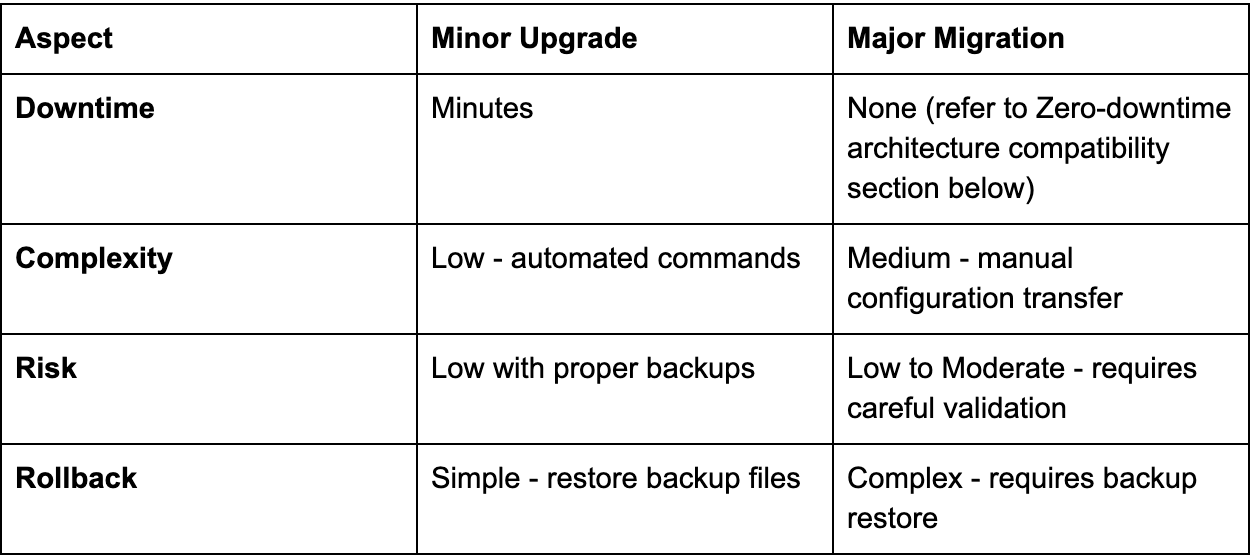
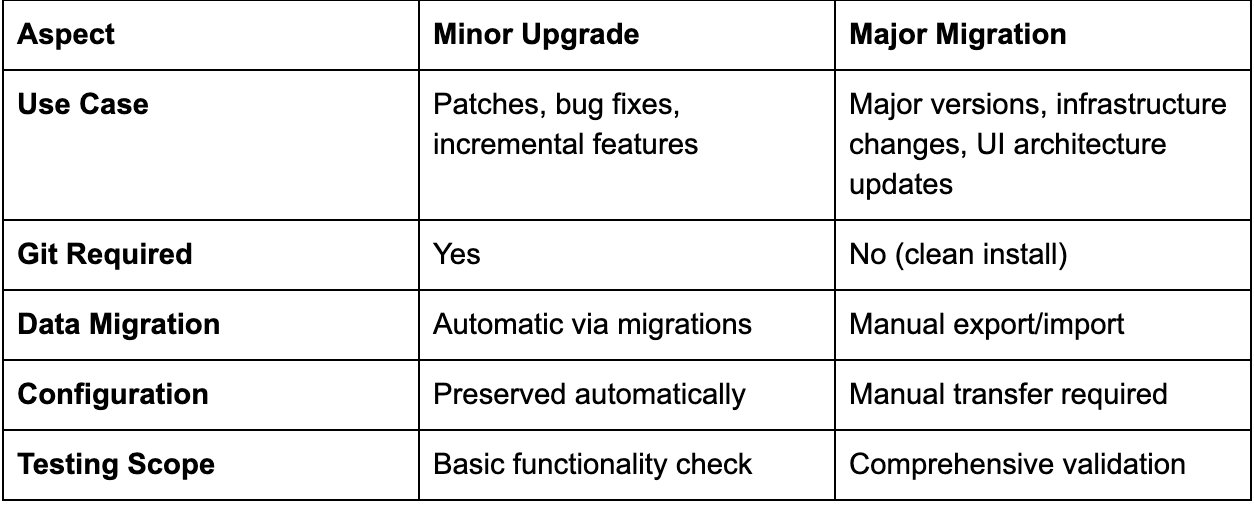
The key differentiator between these approaches is architectural compatibility. Minor upgrades assume backward-compatible changes within the same major version lineage, while major migrations account for breaking changes, dependency shifts, and deployment model evolution.
The Evolution of DreamFactory's UI Architecture
Historical Context: Bundled vs Decoupled UI
Prior to DreamFactory 5.x and continuing through early major releases, the admin interface was tightly integrated with the core Laravel application. The UI components were compiled into the main application bundle, deployed as part of the monolithic PHP application, and served directly from the same web server instance handling API requests.
Traditional deployment characteristics:
- UI assets compiled into
/publicdirectory - No separate build process for frontend updates
- UI versioning tied directly to backend releases
- Limited flexibility for frontend-only updates
Modern Architecture: Separated Admin Interface
Beginning with more recent major versions, DreamFactory transitioned to a fully decoupled admin interface built with Angular 16+. This architectural shift introduced several significant changes:
Modern deployment characteristics:
- Admin interface lives in
dreamfactory-development-packages/df-admin-interface - Separate npm-based build pipeline (
npm start,npm run build) - Independent versioning and update cycles
- Proxy-based development workflow
- Production builds compiled and deployed separately
This decoupling provides substantial benefits for development velocity, security isolation, and scalability, but when migrating between major versions—particularly from older versions with bundled UI to modern versions with decoupled architecture—a complete UI migration is required. You cannot simply pull new code and restart services.
Minor Version Upgrades: In-Place Updates
When to Use Minor Upgrades
Minor version upgrades are appropriate for:
- Patch releases (7.0.1 → 7.0.2)
- Minor version increments within the same major version (7.0.x → 7.1.x)
- Security patches that don't break API compatibility
- Bug fixes and performance improvements
- Feature additions that maintain backward compatibility
Prerequisites and Requirements
Before initiating a minor upgrade:
- Complete backup strategy: Both filesystem and database backups
- Git repository verification: Installation must be a proper Git repository
- Command-line access: SSH or direct shell access to the server
- Permission validation: Correct ownership on
storage/andbootstrap/cache/ - Maintenance window: Brief downtime for cache clearing and service restart

Step-by-Step Minor Upgrade Process
1. Create Comprehensive Backups
Navigate above your DreamFactory root directory (typically /opt/dreamfactory):
cd /opt
cp -r dreamfactory dreamfactory.backup
Execute a database backup using the appropriate command for your DBMS:
# MySQL example
mysqldump -u root -p --databases dreamfactory --no-create-db > dreamfactory_backup.sql
2. Prepare the Upgrade Environment
Navigate to DreamFactory root and stash any local modifications:
cd /opt/dreamfactory
git stash
Stashing preserves custom configuration changes or local patches that haven't been committed. You can restore these after upgrade with git stash pop if needed.
3. Pull Latest Source Code
Switch to the master branch and pull updates:
git checkout master
git pull origin master
This retrieves the latest code from the DreamFactory repository while preserving your installation's Git history.
4. Download Commercial Packages (Commercial Users Only)
For DreamFactory Commercial Edition users, use your provided SFTP credentials to download the required Composer files for the version you're upgrading to. These license files contain commercial-only features and modules not available in the open-source edition.
Open Source users can skip this step entirely and proceed directly to Step 5.
5. Update Dependencies and Schema
Set proper permissions on cache directories (replace {web-service-user} with your web server user like www-data or dreamfactory):
sudo chown -R {web-service-user}:{your-user-group} storage/ bootstrap/cache/
sudo chmod -R 2775 storage/ bootstrap/cache/
Update Composer dependencies to match the new version's requirements:
composer install --no-dev --ignore-platform-reqsApply database migrations to update schema:
php artisan migrate --seedClear compiled caches:
php artisan cache:clear
php artisan config:clear
6. Restart Web Services
For Nginx (DreamFactory's default web server):
sudo systemctl restart nginxOr for Apache:
sudo systemctl restart apache2Troubleshooting Minor Upgrades
Composer dependency conflicts:
composer clear-cache
rm -rf vendor/
composer install --no-dev --ignore-platform-reqs
Permission errors post-upgrade:
sudo chown -R {web-service-user}:{your-user-group} storage/ bootstrap/cache/
sudo chmod -R 2775 storage/ bootstrap/cache/
Artisan command failures:
rm -rf bootstrap/cache/compiled.php storage/framework/cache/*
composer install --no-dev --ignore-platform-reqs
Major Version Migrations: Complete Environment Transfer
When Major Migrations Are Necessary
Major version migrations are required for:
- Major version jumps with breaking changes (4.x → 7.x, 5.x → 7.x)
- Infrastructure modernization (VM → Docker, on-premise → cloud)
- Database engine upgrades (MySQL 5.6 → 8.0)
- Operating system migrations (Ubuntu 18.04 → 24.04)
- Deployment model changes (traditional → containerized)
- UI architecture transitions (bundled → decoupled admin interface)
Critical Components for Migration
Two components contain all stateful configuration and must be migrated:
1. The .env File
Contains environment-specific configuration:
- APP_KEY: Cryptographic key for data encryption (absolutely critical)
- Database connection credentials
- Redis/cache configuration
- API keys and secrets
- Environment flags (APP_ENV, APP_DEBUG)
Without the original APP_KEY, encrypted data becomes unrecoverable.
2. DreamFactory System Database
Stores all administrative configuration:
- User accounts and authentication data
- API service definitions
- Role-based access control rules
- Scripts and server-side logic
- System metadata and settings
File Transfer Methods by Deployment Type
VM/Linux installations:
# FROM remote TO local
scp <user>@<remote-server>:/opt/dreamfactory/.env .
scp <user>@<remote-server>:/opt/dreamfactory/dump.sql .

# FROM local TO remote
scp .env <user>@<new-server>:/opt/dreamfactory/
scp dump.sql <user>@<new-server>:/opt/dreamfactory/
Docker installations:
# FROM container TO local
docker cp df-docker-web-1:/opt/dreamfactory/.env .
docker cp df-docker-web-1:/opt/dreamfactory/dump.sql .

# FROM local TO container
docker cp .env df-docker-web-1:/opt/dreamfactory/
docker cp dump.sql df-docker-web-1:/opt/dreamfactory/
Kubernetes deployments:
# FROM pod TO local
kubectl cp df-namespace/df-pod:/opt/dreamfactory/.env .
kubectl cp df-namespace/df-pod:/opt/dreamfactory/dump.sql .

# FROM local TO pod
kubectl cp .env df-namespace/df-pod:/opt/dreamfactory/
kubectl cp dump.sql df-namespace/df-pod:/opt/dreamfactory/
Step-by-Step Major Migration Process
1. Extract Configuration from Source System
Navigate to DreamFactory root on the source system:
cd /opt/dreamfactoryCopy the .env file to a secure external location using the appropriate transfer method for your deployment type.
2. Export System Database
Create a database dump using credentials from the .env file:
MySQL:
mysqldump -u root -p --databases dreamfactory --no-create-db > dump.sqlPostgreSQL:
pg_dump -U root -d dreamfactory -F p > dump.sqlSQL Server:
Use SQL Server Management Studio (SSMS) to export the database to a .bak file.
SQLite:
sqlite3 dreamfactory.db ".dump" > dump.sqlTransfer the dump file to a secure location using the file transfer method appropriate for your deployment.
3. Provision Target Environment
- Set up a new server or container with a clean OS installation
- Follow the official DreamFactory installation guide for your target platform
- Complete initial setup by creating a temporary administrator account (this will be overwritten during database import)
If migrating from a version with bundled UI to a modern version with decoupled admin interface, ensure the target environment includes the separate df-admin-interface package with proper build dependencies (Node.js, npm).
4. Configure Database Compatibility
MySQL version migrations (5.6 → 5.7+):
If upgrading MySQL versions, disable strict mode by editing config/database.php:
'mysql' => [
    'driver' => 'mysql',
    'host' => env('DB_HOST', '127.0.0.1'),
    // ... other config
    'strict' => false,  // Add this line
],
PHP version requirements: Ensure PHP 8.1 or later is installed on the target system. DreamFactory 7.x+ requires PHP 8.1 minimum.
5. Import Configuration and Data
Transfer the .env file to the target system:
scp .env <user>@<new-server>:/opt/dreamfactory/Transfer the database dump:
scp dump.sql <user>@<new-server>:/opt/dreamfactory/Clear the default database schema created during installation:
php artisan migrate:fresh
php artisan migrate:reset
Import the migrated database:
MySQL:
mysql -u root -p dreamfactory < dump.sqlPostgreSQL:
psql -U root -d dreamfactory < dump.sqlSQL Server:
Use SSMS to restore the database from the backup file.
SQLite:
sqlite3 dreamfactory.db < dump.sql6. Apply Schema Updates and Finalize
Run migrations to update database schema to the new version:
php artisan migrate --seedEdit .env and replace the APP_KEY with the value from your original installation:
APP_KEY=base64:YOUR_ORIGINAL_APP_KEY_VALUE_HEREClear all caches:
php artisan cache:clear
php artisan config:clear
Verification and Testing
Regardless of upgrade type, perform comprehensive verification:
Functional Verification
- Authentication: Log in with migrated credentials
- API endpoints: Test all critical API services
- Database connections: Verify connectivity to external databases
- Scripts: Execute server-side scripts and verify output
- File storage: Test file upload/download operations
Administrative Verification
- User accounts: Confirm all users and roles are present
- Service definitions: Check API service configurations
- Access control: Validate role-based access control rules
- System logs: Review logs for errors or warnings
Performance Verification
- Response times: Benchmark API response times
- Cache functionality: Verify Redis/cache operations
- Database performance: Check query performance
- Resource utilization: Monitor CPU, memory, disk I/O

Key Differences: Minor Upgrade vs Major Migration
Best Practices for Both Upgrade Paths
Before Any Upgrade
- Document current state: Record version numbers, configurations, custom modifications
- Test in staging: Always perform upgrades in a non-production environment first
- Schedule maintenance windows: Plan upgrades during low-traffic periods
- Notify stakeholders: Inform API consumers of planned downtime
- Verify backup integrity: Test backup restoration before beginning upgrade
During Upgrades
- Monitor logs: Watch for errors during migration and update processes
- Verify each step: Don't skip verification between critical steps
- Document issues: Record any problems for troubleshooting
- Maintain communication: Keep stakeholders informed of progress
After Upgrades
- Comprehensive testing: Test all API endpoints and admin functions
- Performance monitoring: Watch for degradation or anomalies
- Log review: Analyze logs for warnings or errors
- User feedback: Collect feedback from API consumers
- Documentation updates: Update internal documentation with new version info
When to Choose DreamFactory for API Management
DreamFactory's upgrade architecture reflects its design philosophy: provide enterprise-grade API management with minimal operational overhead. The platform's modular architecture, clear upgrade paths, and comprehensive migration tooling make it particularly well-suited for organizations that prioritize:
Operational simplicity: Clear, documented upgrade procedures reduce the expertise required for maintenance operations. Teams can execute upgrades confidently without specialized consulting.
Long-term maintainability: The separation between minor incremental updates and major architectural migrations provides flexibility. Organizations can stay current with security patches while deferring major infrastructure changes until convenient.
Data sovereignty and control: Unlike SaaS API management platforms, DreamFactory's self-hosted model means upgrades don't require data synchronization with external vendors. Your .env file and system database contain all configuration—there are no external dependencies.
Zero-downtime architecture compatibility: DreamFactory's upgrade model supports blue-green deployment strategies. With proper load balancing, teams can run new and old versions simultaneously during migration testing.
Regulatory compliance workflows: The ability to fully control upgrade timing, test in isolated environments, and maintain complete audit logs of configuration changes makes DreamFactory suitable for regulated industries with strict change management requirements.
For organizations evaluating API management platforms, DreamFactory's approach to version management should be considered alongside feature comparisons. The total cost of ownership includes not just licensing and initial setup, but the ongoing operational burden of keeping the platform current, secure, and performant. DreamFactory's clear upgrade paths and self-contained architecture minimize that long-term operational cost.
Conclusion
Understanding the distinction between minor version upgrades and major version migrations is essential for DreamFactory administrators. Minor upgrades provide a streamlined path for incremental improvements, while major migrations accommodate significant architectural evolution—including the transition from bundled to decoupled UI deployments that characterizes modern DreamFactory versions.
The key to successful upgrades is matching the approach to the scope of change: use in-place upgrades for backward-compatible updates, and employ full migration procedures when crossing major version boundaries or modernizing deployment architecture. With proper planning, comprehensive backups, and systematic verification, both upgrade paths can be executed with minimal risk and downtime.
As DreamFactory continues evolving toward cloud-native, containerized deployment models, the upgrade procedures documented here provide a foundation for maintaining system currency while preserving the accumulated configuration, logic, and integrations that make each DreamFactory installation unique.