---
title: "RBAC, Rate Limits, and Audit Logs: Enterprise Security Built In"
description: Use RBAC, configurable rate limits, and detailed audit logs to secure APIs, prevent abuse, and meet compliance in multi-tenant enterprise environments.
image: https://assets.seobotai.com/cdn-cgi/image/quality=75,w=1536,h=1024/dreamfactory.com/697e9ca80bb6b48a41016c03-1769914066379.jpg
---
[](https://www.dreamfactory.com/)
Products & Services
[AI Data Gateway](https://www.dreamfactory.com/ai-data-gateway/overview)
[Overview Why DreamFactory exists](https://www.dreamfactory.com/ai-data-gateway/overview) [Data Gov, Comp, Security Policy enforcement at the API layer](https://www.dreamfactory.com/ai-data-gateway/ai-data-governance) [Standard API Layer One contract for every backend](https://www.dreamfactory.com/ai-data-gateway/standard-api-layer) [API Gateway Functionality Routing, auth, rate limits, observability](https://www.dreamfactory.com/ai-data-gateway/api-gateway-functionality) [Deployment & Integration Self-hosted, cloud, hybrid](https://www.dreamfactory.com/ai-data-gateway/on-premise-deployment-and-integration) [Developer Productivity Auto-generated, never hand-coded](https://www.dreamfactory.com/ai-data-gateway/ai-development-accelerated) [AI App Architectures Patterns for RAG, agents, MCP](https://www.dreamfactory.com/ai-data-gateway/enterprise-ai-architectures)
AI Data Models
[AIOpenAI](https://www.dreamfactory.com/use-cases/openai) [GGoogle Gemini](https://www.dreamfactory.com/use-cases/google-gemini) [CAnthropic Claude](https://www.dreamfactory.com/use-cases/anthropic-claude-landing) [LMeta Llama](https://www.dreamfactory.com/use-cases/meta-llama) [MMistral AI](https://www.dreamfactory.com/use-cases/mistral) [CoCohere](https://www.dreamfactory.com/use-cases/cohere)
Services and support
[Quickstart Service Packages Expert-led Quickstarts to production](https://www.dreamfactory.com/services-and-support/quickstart-services-packages)
API Management
[Generate & Manage REST APIs From any database, in seconds](https://www.dreamfactory.com/api-management/generate-rest-apis) [Features Security, scripting, self-hosted & more](https://www.dreamfactory.com/api-management/features) [API Generation The complete guide to auto-generated APIs](https://blog.dreamfactory.com/a-complete-guide-to-api-generation) [API Management Concepts, tools, and best practises](https://blog.dreamfactory.com/what-is-api-management-a-brief-overview-of-api-management-concepts-and-tools?_gl=1*jl0njh*_gcl_au*MjQzMjgwMTc3LjE3ODIzMjI3MzY)
Use Cases
AI Use Cases
[AI Data Access Secure, governed reads for your LLMs](https://www.dreamfactory.com/use-cases/ai-data-access) [MCP Server Drop-in Model Context Protocol](https://www.dreamfactory.com/use-cases/mcp-server) [Legacy Modernization Wrap mainframes with REST](https://www.dreamfactory.com/use-cases/legacy-modernization) [Data Governance Audit every call, enforce every policy](https://www.dreamfactory.com/use-cases/data-governance)
[Customer Case Studies](https://www.dreamfactory.com/case-studies)
[Energy Modernization](https://www.dreamfactory.com/case-studies/energy-snowflake-modernization) [Government Modernization](https://www.dreamfactory.com/case-studies/government-mainframe-oracle-modernization) [Government Business Intelligence](https://www.dreamfactory.com/case-studies/government-sql-server-bi-analyst-queries) [Manufacturing Modernization](https://www.dreamfactory.com/case-studies/steel-manufacturing-sap-erp-modernization) [Financial Services Investor Portal](https://www.dreamfactory.com/case-studies/financial-services-sql-server-investor-portal) [Non-Profit Partner Data Sharing](https://www.dreamfactory.com/case-studies/non-profit-sql-server-partner-data-sharing) [Professional Services Exec Dashboards](https://www.dreamfactory.com/case-studies/professional-services-erp-dashboards) [Education HR and External Data Sharing](https://www.dreamfactory.com/case-studies/education-student-hr-sql-server-mysql-external-data-sharing)
Industries
Industries
#### [Healthcare HIPAA-grade APIs across EHR, claims, and labs.](https://www.dreamfactory.com/use-cases/healthcare)
#### [Financial Services Portfolios, partners, and portals on one layer.](https://www.dreamfactory.com/use-cases/financial-services)
#### [Government Modernize mainframes without re-platforming.](https://www.dreamfactory.com/use-cases/government)
#### [Manufacturing SAP, MES, and shop-floor data, governed.](https://www.dreamfactory.com/use-cases/manufacturing)
#### [Spotlight How enterprises run on DreamFactory From healthcare to energy to finance — governance baked into every endpoint. Browse case studies →](https://www.dreamfactory.com/case-studies)
Connectors
SQL Database
[SQL SQL Server](https://www.dreamfactory.com/connectors/sql-server) [OR Oracle](https://www.dreamfactory.com/connectors/oracle) [PG PostgreSQL](https://www.dreamfactory.com/connectors/postgresql) [My MySQL](https://www.dreamfactory.com/connectors/mysql)
NoSQL & Docs
[Dy DynamoDB](https://www.dreamfactory.com/connectors/dynamodb) [Do DocumentDB](https://www.dreamfactory.com/connectors/azure-documentdb) [Mo MongoDB](https://www.dreamfactory.com/connectors/mongodb) [Cb CouchDB](https://www.dreamfactory.com/connectors/couch-db)
Cloud Warehouses
[S3 S3](https://www.dreamfactory.com/connectors/amazon-s3) [Ab Azureblob](https://www.dreamfactory.com/connectors/azure-blob) [FS FTP/SFTP](https://www.dreamfactory.com/connectors/ftp-sftp) [LS Local Storage](https://www.dreamfactory.com/connectors/local-storage)
C & SaaS
[Sf Salesforce](https://www.dreamfactory.com/connectors/salesforce) [API REST / SOAP](https://www.dreamfactory.com/connectors/soap-to-rest)
[See all 30+ connectors](https://www.dreamfactory.com/connectors)
[Blog](https://blog.dreamfactory.com/)
[FREE 30 Minute Demo](https://www.dreamfactory.com/demo)
[](https://www.dreamfactory.com/)
 
Back to main menu
Products & Services
Use Cases
Industries
Connectors
[Blog](https://blog.dreamfactory.com/)
[FREE 30 Minute Demo](https://www.dreamfactory.com/demo)
[AI Data Gateway](https://www.dreamfactory.com/ai-data-gateway/overview)
[Overview Why DreamFactory exists](https://www.dreamfactory.com/ai-data-gateway/overview) [Data Gov, Comp, Security Policy enforcement at the API layer](https://www.dreamfactory.com/ai-data-gateway/ai-data-governance) [Standard API Layer One contract for every backend](https://www.dreamfactory.com/ai-data-gateway/standard-api-layer) [API Gateway Functionality Routing, auth, rate limits, observability](https://www.dreamfactory.com/ai-data-gateway/api-gateway-functionality) [Deployment & Integration Self-hosted, cloud, hybrid](https://www.dreamfactory.com/ai-data-gateway/on-premise-deployment-and-integration) [Developer Productivity Auto-generated, never hand-coded](https://www.dreamfactory.com/ai-data-gateway/ai-development-accelerated) [AI App Architectures Patterns for RAG, agents, MCP](https://www.dreamfactory.com/ai-data-gateway/enterprise-ai-architectures)
AI Data Models
[AIOpenAI](https://www.dreamfactory.com/use-cases/openai) [GGoogle Gemini](https://www.dreamfactory.com/use-cases/google-gemini) [CAnthropic Claude](https://www.dreamfactory.com/use-cases/anthropic-claude-landing) [LMeta Llama](https://www.dreamfactory.com/use-cases/meta-llama) [MMistral AI](https://www.dreamfactory.com/use-cases/mistral) [CoCohere](https://www.dreamfactory.com/use-cases/cohere)
Services and support
[Quickstart Service Packages Expert-led Quickstarts to production](https://www.dreamfactory.com/services-and-support/quickstart-services-packages)
AI Data Models
[Generate & Manage REST APIs From any database, in seconds](https://www.dreamfactory.com/api-management/generate-rest-apis) [Features Security, scripting, self-hosted & more](https://www.dreamfactory.com/api-management/features) [API Generation The complete guide to auto-generated APIs](https://blog.dreamfactory.com/a-complete-guide-to-api-generation) [API Management Concepts, tools, and best practises](https://blog.dreamfactory.com/what-is-api-management-a-brief-overview-of-api-management-concepts-and-tools?_gl=1*jl0njh*_gcl_au*MjQzMjgwMTc3LjE3ODIzMjI3MzY)
AI Use Cases
[AI Data Access Secure, governed reads for your LLMs](https://www.dreamfactory.com/use-cases/ai-data-access) [MCP Server Drop-in Model Context Protocol](https://www.dreamfactory.com/use-cases/mcp-server) [Legacy Modernization Wrap mainframes with REST](https://www.dreamfactory.com/use-cases/legacy-modernization) [Data Governance Audit every call, enforce every policy](https://www.dreamfactory.com/use-cases/data-governance)
[Customer Case Studies](https://www.dreamfactory.com/case-studies)
[Energy Modernization](https://www.dreamfactory.com/case-studies/energy-snowflake-modernization) [Government Modernization](https://www.dreamfactory.com/case-studies/government-mainframe-oracle-modernization) [Government Business Intelligence](https://www.dreamfactory.com/case-studies/government-sql-server-bi-analyst-queries) [Manufacturing Modernization](https://www.dreamfactory.com/case-studies/steel-manufacturing-sap-erp-modernization) [Financial Services Investor Portal](https://www.dreamfactory.com/case-studies/financial-services-sql-server-investor-portal) [Non-Profit Partner Data Sharing](https://www.dreamfactory.com/case-studies/non-profit-sql-server-partner-data-sharing) [Professional Services Exec Dashboards](https://www.dreamfactory.com/case-studies/professional-services-erp-dashboards) [Education HR and External Data Sharing](https://www.dreamfactory.com/case-studies/education-student-hr-sql-server-mysql-external-data-sharing)
Industries
#### [Healthcare HIPAA-grade APIs across EHR, claims, and labs.](https://www.dreamfactory.com/use-cases/healthcare)
#### [Financial Services Portfolios, partners, and portals on one layer.](https://www.dreamfactory.com/use-cases/financial-services)
#### [Government Modernize mainframes without re-platforming.](https://www.dreamfactory.com/use-cases/government)
#### [Manufacturing SAP, MES, and shop-floor data, governed.](https://www.dreamfactory.com/use-cases/manufacturing)
SQL Database
[SQL SQL Server](https://www.dreamfactory.com/connectors/sql-server) [OR Oracle](https://www.dreamfactory.com/connectors/oracle) [PG PostgreSQL](https://www.dreamfactory.com/connectors/postgresql) [My MySQL](https://www.dreamfactory.com/connectors/mysql)
NoSQL & Docs
[Dy DynamoDB](https://www.dreamfactory.com/connectors/dynamodb) [Do DocumentDB](https://www.dreamfactory.com/connectors/azure-documentdb) [Mo MongoDB](https://www.dreamfactory.com/connectors/mongodb) [Cb CouchDB](https://www.dreamfactory.com/connectors/couch-db)
Cloud Warehouses
[S3 S3](https://www.dreamfactory.com/connectors/amazon-s3) [Ab Azureblob](https://www.dreamfactory.com/connectors/azure-blob) [FS FTP/SFTP](https://www.dreamfactory.com/connectors/ftp-sftp) [LS Local Storage](https://www.dreamfactory.com/connectors/local-storage)
C & SaaS
[Sf Salesforce](https://www.dreamfactory.com/connectors/salesforce) [API REST / SOAP](https://www.dreamfactory.com/connectors/soap-to-rest)
[See all 30+ connectors](https://www.dreamfactory.com/connectors)
[ Blog](https://blog.dreamfactory.com/)
# RBAC, Rate Limits, and Audit Logs: Enterprise Security Built In
by Kevin Hood
 January 31, 2026
Table of contents
RECOMMENDED ARTICLES
- [A Complete Guide to API Generation](https://blog.dreamfactory.com/a-complete-guide-to-api-generation)
- [10 Best API Management Tools](https://blog.dreamfactory.com/what-is-api-management-a-brief-overview-of-api-management-concepts-and-tools)
- [Creating a Microsoft SQL Server API in Less Than 5 minutes with DreamFactory](https://blog.dreamfactory.com/creating-a-microsoft-sql-server-api-in-less-than-5-minutes-with-dreamfactory)
- [Hasura vs. DreamFactory: A Comprehensive Comparison](https://blog.dreamfactory.com/hasura-vs-dreamfactory)
- [Build A Snowflake REST API in Less Than 5 Minutes](https://blog.dreamfactory.com/generate-a-snowflake-rest-api-in-less-than-5-minutes)
**APIs now handle 83% of all web traffic, but they’re also a major security target - 84% of organizations reported API-related security incidents last year, with 95% of attacks originating from authenticated sessions.** Authentication alone isn’t enough. To secure APIs, you need three core tools:
- **RBAC (Role-Based Access Control):** Restricts user access to only what’s necessary for their role, reducing risks through the principle of least privilege.
- **Rate Limiting:** Controls API usage to prevent abuse, like brute-force attacks or system overloads.
- **Audit Logs:** Tracks every API interaction for anomaly detection, incident investigation, and compliance with regulations like [GDPR](https://en.wikipedia.org/wiki/General_Data_Protection_Regulation) and [HIPAA](https://en.wikipedia.org/wiki/Health_Insurance_Portability_and_Accountability_Act).
[DreamFactory](https://dreamfactory.com/) simplifies API security by integrating these features into its platform. It offers automated RBAC, precise field-level access control, configurable rate limits, and detailed audit logging that connects with SIEM and compliance systems. This reduces the risk of security misconfigurations, which account for 54% of API attacks, and helps teams focus on building features instead of custom security logic.
**Key takeaway:** Combining RBAC, rate limiting, and audit logs creates a secure API environment that protects sensitive data, prevents abuse, and ensures compliance.
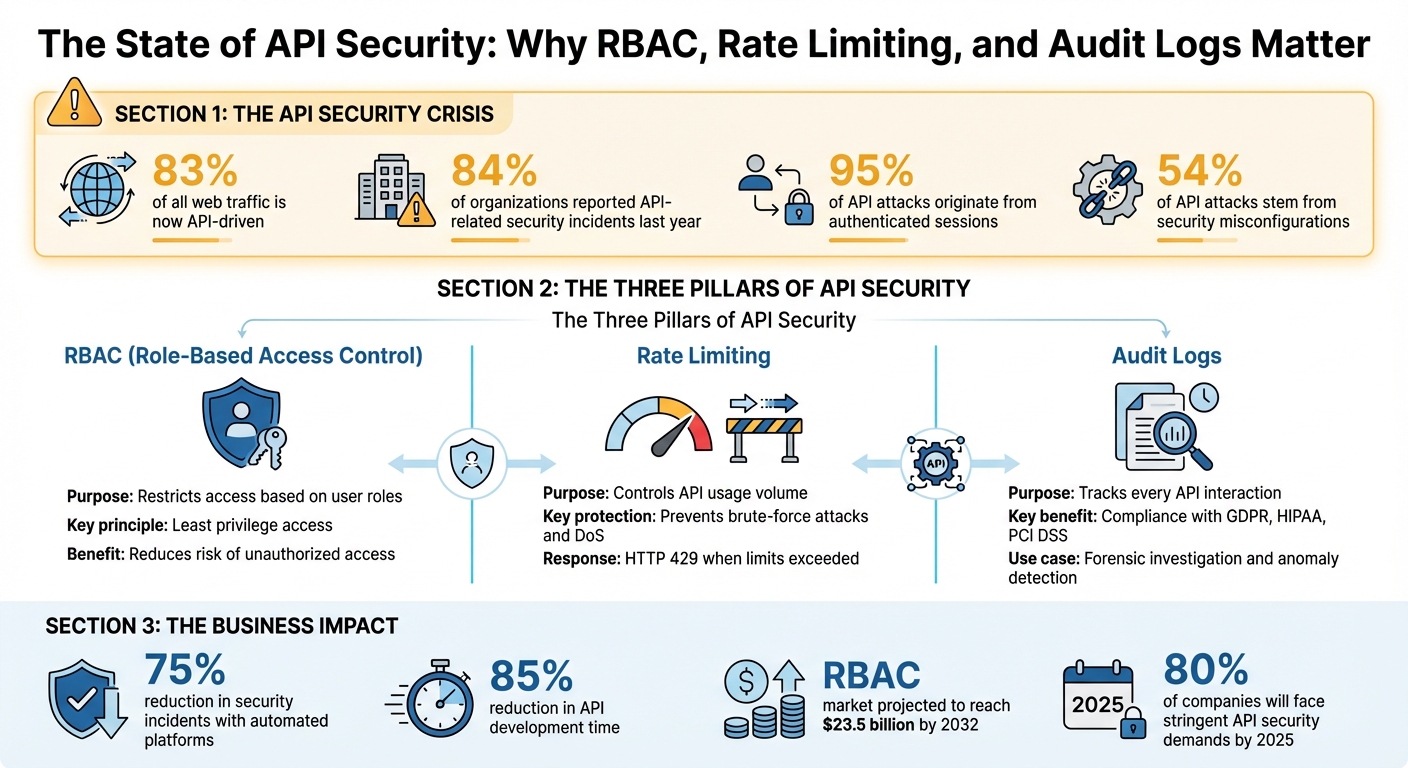
API Security Statistics and Enterprise Protection Framework
## Role-Based Access Control (RBAC): Managing User Permissions
### What is RBAC and Least Privilege Access
RBAC simplifies permission management by assigning access based on roles like "admin", "developer", or "viewer." Instead of managing permissions for every individual, you assign users to predefined roles. This concept, originally used in military classification systems, is now widely adopted in enterprise software. NIST defines RBAC as a method to separate duties and reduce the risk of fraud.
At the core of RBAC is the **principle of least privilege**. This means users only have access to the resources they need to perform their tasks - nothing extra. For example, in APIs that handle sensitive enterprise data, a "viewer" role limited to reading metrics is far less risky than a role with write access to critical databases. This approach minimizes potential damage if an account is compromised.
Now, let’s look at how to implement RBAC effectively in DreamFactory.
### Setting Up RBAC in [DreamFactory](https://dreamfactory.com/)
DreamFactory organizes security in layers: **API Key → Role(s) → Service/Component Access → HTTP Methods**. To set up RBAC, you start by creating a role in the admin console and assigning permissions for specific services. Within each service, you can fine-tune access to specific components. For instance, a role might only have access to the `_table/employees` table rather than the entire database.
Permissions can also be refined by HTTP methods. For example, a "read-only" role might only allow GET requests, while a "data analyst" role could allow both GET and POST. For [multi-tenant environments](https://blog.dreamfactory.com/securing-a-multitenant-database-api-with-dreamfactory/), you can use SQL WHERE clauses (e.g., `user_id = {user.id}`) to ensure users only access their own data. This setup prevents User A in one tenant from seeing data belonging to User B in another, even if they share the same API endpoint.
DreamFactory APIs are private by default. Every request requires an API key, and any changes to roles take effect instantly. This means session tokens for deactivated accounts are invalidated immediately, ensuring security updates are enforced in real time.
### Connecting RBAC with Your Authentication Systems
DreamFactory supports **identity passthrough**, allowing seamless integration with authentication systems like [OAuth 2.0](https://en.wikipedia.org/wiki/OAuth), [OpenID Connect](https://openid.net/developers/how-connect-works/), [LDAP](https://en.wikipedia.org/wiki/Lightweight_Directory_Access_Protocol), [Active Directory](https://learn.microsoft.com/en-us/windows-server/identity/ad-ds/get-started/virtual-dc/active-directory-domain-services-overview), and [SAML](https://en.wikipedia.org/wiki/Security_Assertion_Markup_Language) for single sign-on (SSO). When a user logs in through an external provider (e.g., [Okta](https://www.okta.com/) or Azure AD), DreamFactory generates a JWT containing the user's identity and role. This token, passed in the `X-DreamFactory-Session-Token` header, ensures RBAC rules are enforced automatically.
To set this up, configure your identity provider as a service under Security > Authentication and assign a **Default Role** for users who authenticate through that provider. For more specific control, the "Role per App" feature allows you to assign different roles to the same user depending on the application they access. You can also use claims from OAuth tokens to trigger automatic role assignments or sync LDAP groups directly with DreamFactory roles. This streamlines permission management and ensures roles stay aligned with your organization’s structure.
Once RBAC is integrated into your authentication system, the next step is to protect your API traffic with strong rate limiting.
## Rate Limiting: Preventing API Abuse
### Why Rate Limiting Matters for API Security
Rate limiting helps control the number of API calls - like capping requests at 1,000 per minute - to safeguard against abuse. Without this safeguard, your system could be overwhelmed by a single user or a compromised account, whether through accidental misuse or intentional attacks like a Denial-of-Service (DoS). This not only disrupts legitimate users but could also cripple your entire API infrastructure.
Rate limiting also ensures resources are distributed fairly. Imagine one user’s application suddenly making 50,000 requests per hour while the average remains closer to 500 - this imbalance could strain your system. It’s also a key defense against brute-force attacks. For example, if someone repeatedly attempts to guess API keys or passwords, rate limiting blocks further attempts after a certain threshold. When a client exceeds their limit, they receive an HTTP 429 "Too Many Requests" response, temporarily restricting their access.
### Setting Up Rate Limits in DreamFactory
DreamFactory offers rate limiting at six levels: instance, user, role, service, endpoint, and each individual user.
- **Instance limits** apply to your entire platform, covering all services, roles, and users combined.
- **Service limits** control access to specific APIs or databases.
- **Endpoint limits** are more focused, restricting access to individual resources like `_table/employees`.
The "Each User" limit is particularly helpful in [multi-tenant vs. single-tenant setups](https://blog.dreamfactory.com/multi-tenant-vs-single-tenant-systems-which-is-the-optimal-choice/). For instance, if you set a limit of 500 requests per minute, each user gets their own 500-request allowance rather than sharing a single limit.
You can also fine-tune limits based on HTTP methods. For example, you might allow 1,000 GET requests per minute but restrict POST requests to 100 due to the higher resource demand of write operations. Wildcards (e.g., `_table/contact/*`) can be used to apply limits across an entire endpoint branch.
It’s important to note that broader limits override more specific ones. For example, if your instance limit is set to 500 requests per minute, a service limit of 1,000 won’t come into play. In high-traffic scenarios, switching from DreamFactory's default file-based caching to [Redis](https://redis.io/) for storing limits can improve performance. [Redis](https://redis.io/) ensures accurate counters and faster updates when configured in the `.env` file.
### Tracking Rate Limit Metrics
DreamFactory’s admin console provides a progress bar that changes color based on usage - blue for normal, yellow at 75%, and red at 90%. This visual cue helps you spot potential issues before users start hitting the 429 error threshold.
If you need deeper insights, the `api/v2/system/limit_cache` endpoint allows you to programmatically monitor current hit counts and remaining requests. This is especially valuable for automated systems that need real-time updates on quota usage.
For advanced monitoring, you can integrate DreamFactory with tools like [Prometheus](https://prometheus.io/) and Grafana. Using the Logstash connector, API activity data can be sent to the ELK stack (Elasticsearch, Logstash, [Kibana](https://www.elastic.co/kibana)) or directly to Grafana. These tools let you create dashboards to visualize 429 error trends, pinpoint resource-heavy users or services, and adjust limits based on historical traffic patterns.
During unexpected traffic spikes - like a product launch - administrators can manually reset counters. This can be done through the admin console using the lightning bolt icon or by sending a DELETE request to `system/limit_cache/{id}`. This immediate action helps restore access for blocked users without waiting for the limit window to reset.
Next, we’ll look at how audit logs can further enhance API security.
## RBAC for API Tutorial: How to secure your API with RBAC and support Multi-tenant Considerations
## Audit Logs: Tracking API Activity and Ensuring Compliance
Audit logs play a crucial role in enterprise security, working alongside RBAC and rate limiting to ensure accountability and enable swift responses to incidents.
### Why Audit Logs Matter for Enterprise Security
Audit logs capture every authenticated API request, including a timestamp, user identity, accessed endpoint, and HTTP status code. This detailed record is essential for spotting unusual activity, such as sudden surges in token usage or repeated failed login attempts.
These logs also serve as a critical compliance tool for regulations like **GDPR**, **HIPAA**, and [**PCI DSS**](https://en.wikipedia.org/wiki/Payment_Card_Industry_Data_Security_Standard), which require organizations to document data access and processing history. For example, audit logs can quickly pinpoint who accessed sensitive information and when. Without this level of documentation, investigating security breaches or proving compliance during audits becomes almost impossible.
Next, let’s explore how DreamFactory simplifies audit log management to ensure seamless tracking and compliance.
### DreamFactory's Audit Logging Features
DreamFactory automates the collection of detailed audit data, capturing elements like HTTP methods, endpoints, payloads, and user identities for every API request. Whether using [API keys or JWTs](https://blog.dreamfactory.com/the-complete-guide-to-api-tokens), the platform ensures comprehensive logging.
One standout feature is **User Identity Passthrough**, which logs the specific individual or system making a request. Instead of generic entries, you get precise records like "john.smith@company.com accessed the employees table", providing the granularity needed for investigations and audits.
For advanced use cases, DreamFactory's Gold edition offers a **Logstash connector** for seamless integration with tools like **ELK Stack (Elasticsearch, Logstash, Kibana)**, [**Splunk**](https://www.splunk.com/), and **Grafana**. Additionally, server-side scripting in languages like [Node.js](https://nodejs.org/en), PHP, or Python allows for custom log messages. For instance, you could configure an alert to notify your SIEM system whenever a new administrative user is created.
### Connecting Logs with SIEM and Compliance Systems
Integrating audit logs with a **SIEM system** transforms raw data into actionable insights, giving you a complete view of security alongside RBAC and rate limiting. By forwarding DreamFactory logs to tools like Splunk or the ELK Stack, you can perform real-time analysis to uncover patterns. For example, a SIEM might flag multiple failed login attempts from different IPs followed by a successful login from an unexpected location, signaling a potential credential compromise.
For compliance, SIEM systems aggregate logs from multiple APIs to create unified audit trails. These trails can automatically generate reports showing proper access controls and blocked unauthorized attempts. When setting up log forwarding, it's essential to filter sensitive data - such as Social Security Numbers or API keys - before ingestion. Tools like Logstash filters help maintain privacy while preserving the logs' effectiveness for security and compliance.
## Implementation Examples with DreamFactory
Here are three examples showcasing how DreamFactory integrates RBAC, rate limiting, and audit logs into real-world scenarios.
### Building Multi-Tenant APIs with RBAC
A healthcare SaaS provider used DreamFactory in a secure, self-hosted environment to manage APIs for patient data across multiple hospital tenants. Each hospital required complete data isolation while operating on shared infrastructure.
To achieve this, they started in **Admin > Roles**, creating roles like "HospitalAdmin" (full CRUD access for their tenant), "Doctor" (read/write access to clinical records), and "Viewer" (read-only access). Service-level RBAC filters enforced `WHERE tenant_id = :user.tenant_id` on every query, ensuring strict data segregation.
LDAP integration streamlined role assignments by mapping groups to roles, while JWT claims carried tenant IDs to dynamically filter queries. This setup delivered **99.9% uptime** in a secure network while meeting HIPAA compliance standards through role-based isolation.
For example, the "Doctor" role was granted GET (mask: 1), POST (mask: 2), and PATCH (mask: 8) permissions on the `_table/patient_records/*` endpoint. DELETE operations (mask: 16) were restricted to administrators only.
This robust RBAC framework ensured secure and seamless multi-tenant API management. Now, let’s see how rate limits can handle high-traffic APIs.
### Configuring Rate Limits for High-Traffic APIs
An enterprise AI platform managing over 1 million daily queries required precise rate limiting to balance performance and prevent abuse. DreamFactory's **Admin > Config > Rate Limiting** feature allowed the team to set role-based limits: "PremiumUser" accounts were capped at 500 requests per minute, while "Standard" users were limited to 100 requests per minute.
For AI inference endpoints, stricter limits were applied - 50 requests per minute per user, with a burst capacity of 100 to handle traffic spikes. Using Redis for distributed rate limiting across a clustered [Docker](https://www.docker.com/) deployment, the system sustained **5,000 requests per second** with less than 1% of requests exceeding limits and latency consistently under 50 milliseconds.
DreamFactory provided real-time metrics via response headers (`X-RateLimit-Limit`, `X-RateLimit-Remaining`, `X-RateLimit-Reset`) and a dedicated metrics endpoint at `/api/v2/system/metrics`. These metrics were integrated with Prometheus and Grafana, enabling the operations team to monitor usage, identify top users, and adjust limits dynamically based on actual traffic patterns.
> "Don't let LLMs write SQL. Put a secure API gateway between AI and your databases. Enforce zero-trust, parameterization, RBAC, masking, and full-fidelity audit logs." - Kevin McGahey, Solutions Engineer and Product Lead, DreamFactory
This example highlights how DreamFactory [combines access control with performance optimization](https://blog.dreamfactory.com/dreamfactory-for-high-performance-api-needs).
### Using Audit Logs for Compliance Reporting
To complement access controls, detailed audit logs provide essential compliance and threat detection capabilities. A financial services firm, operating in an air-gapped environment, needed forensic-grade audit trails for [SOC 2](https://en.wikipedia.org/wiki/System_and_Organization_Controls) compliance. They enabled logging in **Config > Logging**, setting `APP_LOG_LEVEL` to `INFO` to capture every API call. Logs included timestamps (MM/DD/YYYY format), user IDs, IP addresses, HTTP methods, endpoints, and response codes.
For example, failed authentication attempts were identified with a query like this:
`SELECT * FROM audit_log WHERE status_code=401 AND created_date >= '01/01/2026'`.
When 100 failed logins from a single IP range were detected within an hour, automated scripts flagged the activity as a potential brute-force attack.
The firm deployed a [local ELK stack](https://blog.dreamfactory.com/configure-an-elk-stack-with-dreamfactory) (Elasticsearch, Logstash, Kibana) within their secure perimeter. DreamFactory's Logstash connector forwarded logs via UDP port 12201. Logstash filters removed sensitive data, such as account numbers, before indexing, ensuring compliance while maintaining data integrity. Audit logs were exported as CSV files using the SQL API:
`GET /api/v2/db/_table/audit_log?filter=role_id=3 AND date>='01/01/2026'&format=csv`.
This allowed auditors to review logs without accessing production systems, meeting regulatory requirements while keeping sensitive data secure.
## Best Practices for API Security at Scale
Securing enterprise APIs requires a careful balance between protection, performance, and governance. By combining RBAC, rate limiting, and audit logs with zero-trust principles, continuous monitoring, and performance strategies, businesses can ensure both scalability and compliance. Here’s how to put these practices into action.
### Implementing Zero-Trust Security
Zero-trust security operates on a simple rule: trust no request without verification. Every API request must go through both authentication and authorization. Tools like DreamFactory enforce this by using identity passthrough, which carries user identities from centralized systems like OAuth 2.0, LDAP, or SAML directly to backend services. This approach ensures that audit logs reflect actual users, not generic service accounts, making forensic investigations and compliance reporting more precise.
Granular RBAC (role-based access control) is another cornerstone of zero-trust. Permissions should be defined at multiple levels - service, component (e.g., specific database tables or file directories), and HTTP methods like GET, POST, or DELETE. For instance, a "Data Analyst" might only have GET access to analytical models, while a "Content Creator" could POST to text-generation endpoints but not delete records. This restricts privilege escalation and minimizes the impact of potential breaches.
Identity passthrough also supports mutual TLS or OAuth 2.0 client credentials for service-to-service communication, ensuring backend systems validate every request at the API gateway before it reaches core infrastructure. This approach eliminates implicit trust. Considering that **95% of API attacks come from authenticated sessions**, relying on authentication alone is not enough without layered access controls. Together, these measures create a comprehensive security framework.
### Scaling API Performance
For high-traffic APIs, distributed rate limiting is essential to avoid bottlenecks. DreamFactory leverages **Redis for limit cache storage**, ensuring rate limits stay synchronized across multiple servers. This is critical in environments with heavy traffic.
Rate limits should be applied across various levels - instance, user, role, and endpoint - to provide multiple layers of defense. For example, you might set instance-wide limits at 10,000 requests per hour, user-specific limits at 500 requests per hour, and endpoint-specific limits based on the computational cost of the operation. However, broader limits (like instance-wide) should not unintentionally override more detailed ones.
Caching strategies, such as intelligent token reuse and session caching, can help reduce authentication overhead, cutting latency by 50-70% in high-demand scenarios. Security-aware load balancing further optimizes performance by routing less sensitive traffic to efficient nodes, while more sensitive requests go through additional validation steps. Additionally, ensure production deployments have `APP_DEBUG=false` and `APP_ENV=production` in the `.env` file to prevent sensitive debug information from being exposed to clients.
### Monitoring and Governance
Continuous monitoring is vital to detect unusual activity, such as rate limit breaches or suspicious access patterns, and to maintain compliance as threats and traffic evolve. DreamFactory offers built-in dashboards for monitoring rate limits and exporting audit logs to SIEM systems like Splunk or ELK via webhooks or syslog integration. For example, SIEM systems can trigger alerts when they detect 100 failed login attempts from a single IP range within an hour - an indicator of a brute-force attack.
Automating security policies in CI/CD pipelines can help enforce RBAC and rate limits consistently, reducing configuration drift and enabling risk-based monitoring. Regularly reviewing logs is also crucial. For instance, you can dynamically adjust rate limits during high server loads - scaling from 100 requests per minute to as low as 10 during peak traffic. To maintain compliance, use Logstash filters to strip sensitive data, such as API keys or account numbers, from log streams before storage.
Organizations that use automated platforms with integrated security controls report a **75% drop in security incidents**, while **54% of API attacks** stem from misconfigurations. Regular audits - weekly for security, monthly for compliance, and quarterly for performance - help ensure that RBAC roles, rate limits, and audit logs adapt to your organization’s changing needs. This proactive approach keeps your API security strategy aligned with enterprise demands.
## Conclusion
Securing enterprise APIs is critical for safeguarding sensitive information and meeting compliance requirements. A combination of **RBAC (Role-Based Access Control)**, **rate limiting**, and **audit logs** creates a layered defense strategy. RBAC blocks unauthorized access right at the entry point, rate limiting prevents abuse and ensures system performance, and audit logs offer transparency and traceability for every action within the system. Together, these measures address common API vulnerabilities, including authenticated session attacks and misconfigurations.
DreamFactory takes the complexity out of API security with its built-in, configuration-driven features, reducing the risks associated with manual coding. Organizations leveraging automated platforms with integrated security controls report a **75% drop in security incidents** and an **85% reduction in API development time**. With granular RBAC, multi-tiered rate limiting, and detailed audit logs, DreamFactory streamlines the process of building secure, compliant, and efficient APIs.
These security measures, as covered in earlier sections, are the foundation of a strong API defense framework. DreamFactory’s centralized governance ensures consistent security enforcement across all data sources, whether you're working with [Snowflake](https://www.snowflake.com/en/), [Databricks](https://www.databricks.com/), legacy systems, or file storage solutions. Whether you're developing multi-tenant SaaS platforms, securing AI-powered data access, or modernizing outdated systems, DreamFactory's scalable security features adapt to your needs. With the RBAC market expected to hit **$23.5 billion by 2032** and **80% of companies** facing stringent API security demands by 2025, implementing robust API security is no longer optional - it’s a necessity.
## FAQs
### How does Role-Based Access Control (RBAC) improve API security in shared environments?
Role-Based Access Control (RBAC) plays a key role in boosting API security, especially in shared, multi-tenant environments. By assigning specific roles and permissions to users or groups, RBAC ensures that individuals only access the resources they genuinely need. This targeted approach minimizes the chances of unauthorized access or accidental exposure of sensitive data.
With RBAC, tenants are kept separate, and permissions are tightly controlled. This isolation helps guard against data leaks, improper use of resources, and other potential security threats. For enterprises managing complex systems, RBAC is essential for safeguarding critical data and staying compliant with regulatory requirements.
### What advantages does integrating audit logs with SIEM systems provide?
Integrating audit logs with **SIEM systems** enhances security by centralizing monitoring and enabling quick detection of potential threats. With this setup, organizations can thoroughly analyze access patterns and activity logs, making it easier to spot unusual behavior and address incidents promptly.
It also streamlines compliance reporting by offering a clear, detailed record of system activities. This not only boosts your security measures but also helps ensure your organization stays aligned with regulatory standards.
### What is rate limiting, and how does it protect APIs from abuse while ensuring fair access?
Rate limiting is a protective measure designed to regulate the number of API requests a user or system can make within a set time period. Its primary purpose is to deter **API misuse**, such as high-volume traffic from malicious sources (like DDoS attacks), while also ensuring equitable resource access for all users.
By curbing excessive requests, rate limiting helps ease server load, cut down operational expenses, and safeguard sensitive information. It plays an essential role in preserving **API performance, security, and dependability**, especially in large-scale enterprise settings.
## Related Blog Posts
- [API Security Checklist: Essential Controls for Enterprise APIs](https://blog.dreamfactory.com/blog/api-security-checklist-essential-controls-for-enterprise-apis/)
- [Rate Limiting in Multi-Tenant APIs: Key Strategies](https://blog.dreamfactory.com/blog/rate-limiting-in-multi-tenant-apis-key-strategies/)
- [DreamFactory Logging Features Explained](https://blog.dreamfactory.com/blog/dreamfactory-logging-features-explained/)
- [Data Integration Logging: Best Practices](https://blog.dreamfactory.com/blog/data-integration-logging-best-practices/)

Kevin Hood
Kevin Hood is an accomplished solutions engineer specializing in data analytics and AI, enterprise data governance, data integration, and API-led initiatives.
Stay Connected with
The Connector Newsletter!
Subscribe to stay up-to-date with DreamFactory's latest product updates, API best practices, and tech humor in your inbox.
[](https://www.dreamfactory.com/)
[Call Sales +1 (415) 993-5877](tel:+14159935877)
Open – Mon–Fri 9–5 PT
[FREE 30 Minute Demo](https://www.dreamfactory.com/demo)
#### Follow us
- [GitHub](https://github.com/dreamfactorysoftware/dreamfactory)
- [Facebook](https://www.facebook.com/dfsoftwareinc/)
- [X (Twitter)](https://twitter.com/dfsoftwareinc)
- [LinkedIn](https://www.linkedin.com/company/dreamfactory-software)
- [YouTube](https://www.youtube.com/c/dreamfactorysoftware)
### Features
[Features](https://www.dreamfactory.com/features) [Self hosted](https://www.dreamfactory.com/features#self) [API Generation](https://www.dreamfactory.com/features#api) [Security](https://www.dreamfactory.com/features#secure) [Customization](https://www.dreamfactory.com/features#custom) [Pricing](https://www.dreamfactory.com/pricing)
### Installers
[Linux](https://www.dreamfactory.com/features#installer) [Docker](https://www.dreamfactory.com/features#installer) [Kubernetes](https://www.dreamfactory.com/features#installer)
### API Resources
[Documentation](https://docs.dreamfactory.com/) [Case Studies](https://www.dreamfactory.com/stories) [White Papers](https://www.dreamfactory.com/resources/whitepapers) [Academy](https://www.dreamfactory.com/academy) [API Calculator](https://calculator.dreamfactory.com) [Open Source](https://github.com/dreamfactorysoftware)
### Company
[Blog](https://blog.dreamfactory.com/) [Hub](https://www.dreamfactory.com/hub) [About us](https://www.dreamfactory.com/about) [Partners](https://www.dreamfactory.com/partners) [Support](https://www.dreamfactory.com/support) [Connectors](https://www.dreamfactory.com/connectors) [Contact Us](https://www.dreamfactory.com/demo)
© 2025 DreamFactory. All rights reserved.
[Terms of Use](https://www.dreamfactory.com/terms-of-use) [Privacy Policy](https://www.dreamfactory.com/privacy-policy) [LLMs](https://www.dreamfactory.com/llms.txt)
```json
{
"@context" : "https://schema.org",
"@type" : "BlogPosting",
"author" : {
"@type" : "Person",
"name" : "Kevin Hood",
"url" : "https://blog.dreamfactory.com/author/kevin-hoo"
},
"datePublished" : "2026-02-01T02:41:19.000Z",
"headline" : "RBAC, Rate Limits, and Audit Logs: Enterprise Security Built In",
"image" : [ "https://assets.seobotai.com/cdn-cgi/image/quality=75,w=1536,h=1024/dreamfactory.com/697e9ca80bb6b48a41016c03-1769914066379.jpg" ],
"mainEntityOfPage" : {
"@id" : "https://blog.dreamfactory.com/rbac-rate-limits-audit-logs-enterprise-security-built-in",
"@type" : "WebPage"
},
"publisher" : {
"@type" : "Organization",
"logo" : {
"@type" : "ImageObject",
"url" : "https://blog.dreamfactory.com/hubfs/DreamFactory%20-%20Orange%20-%20Transparent-1.png"
}
}
}
```
```json
{
"@context" : "https://schema.org",
"@type" : "FAQPage",
"mainEntity" : [ {
"@type" : "Question",
"acceptedAnswer" : {
"@type" : "Answer",
"text" : "Role-Based Access Control (RBAC) plays a key role in boosting API security, especially in shared, multi-tenant environments. By assigning specific roles and permissions to users or groups, RBAC ensures that individuals only access the resources they genuinely need. This targeted approach minimizes the chances of unauthorized access or accidental exposure of sensitive data.
With RBAC, tenants are kept separate, and permissions are tightly controlled. This isolation helps guard against data leaks, improper use of resources, and other potential security threats. For enterprises managing complex systems, RBAC is essential for safeguarding critical data and staying compliant with regulatory requirements.
"
},
"name" : "How does Role-Based Access Control (RBAC) improve API security in shared environments?"
}, {
"@type" : "Question",
"acceptedAnswer" : {
"@type" : "Answer",
"text" : "Integrating audit logs with SIEM systems enhances security by centralizing monitoring and enabling quick detection of potential threats. With this setup, organizations can thoroughly analyze access patterns and activity logs, making it easier to spot unusual behavior and address incidents promptly.
It also streamlines compliance reporting by offering a clear, detailed record of system activities. This not only boosts your security measures but also helps ensure your organization stays aligned with regulatory standards.
"
},
"name" : "What advantages does integrating audit logs with SIEM systems provide?"
}, {
"@type" : "Question",
"acceptedAnswer" : {
"@type" : "Answer",
"text" : "Rate limiting is a protective measure designed to regulate the number of API requests a user or system can make within a set time period. Its primary purpose is to deter API misuse, such as high-volume traffic from malicious sources (like DDoS attacks), while also ensuring equitable resource access for all users.
By curbing excessive requests, rate limiting helps ease server load, cut down operational expenses, and safeguard sensitive information. It plays an essential role in preserving API performance, security, and dependability, especially in large-scale enterprise settings.
"
},
"name" : "What is rate limiting, and how does it protect APIs from abuse while ensuring fair access?"
} ]
}
```